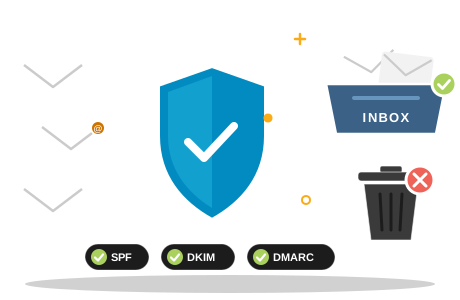
- The most common reason business email lands in spam is missing or broken authentication: SPF, DKIM and DMARC.
- Gmail, Yahoo and Outlook.com now require authentication, and high-volume senders must have all three.
- Content, sending habits and your server's reputation matter too, but fix authentication first.
- Send a test message and read its headers: they show exactly which check failed.
You send a quote, the customer never sees it, and weeks later it turns up in their junk folder. If you are asking yourself why are my emails going to spam, the cause is usually one of a handful of fixable problems, and the most common one is missing email authentication.
This guide explains the usual causes, what SPF, DKIM and DMARC do in plain language, what the big mailbox providers require as of October 2026, and a checklist you or your IT provider can work through to get your messages back into the inbox.
Why Emails Go to Spam: The Usual Suspects
- Missing or incorrect authentication. No SPF, DKIM or DMARC records, or records that do not match the servers you actually send from.
- Forgotten senders. Your invoicing software, website contact form or newsletter tool sends in your name, but your domain's records do not authorise it.
- A poor reputation. The server or domain you send from has been used for spam, for example because a mailbox password was stolen.
- A blocklisted IP address. Many receiving servers check public blocklists and reject or junk mail from listed addresses.
- Spam-like content. Misleading subject lines, a message that is just one large image, link shorteners or unexpected attachments.
- Bad lists. Sending to old, bought or guessed addresses causes bounces and complaints, and both damage your reputation.
- Recipients clicking "Report spam". Mailbox providers take these complaints very seriously.
SPF: Who Is Allowed to Send for Your Domain
SPF (Sender Policy Framework) is a list, published in your domain's DNS, of the servers allowed to send email for your domain. A receiving server compares the sending server against that list.
An SPF record is a TXT record on your domain. An example for example.com.na:
v=spf1 mx include:_spf.mailservice.example ~all
This says: our own mail servers (mx) and the servers of our mail service may send for us; treat mail from anywhere else as suspicious (~all). Two rules trip people up:
- Only one SPF record per domain. If you add a second service, merge it into the existing record instead of creating another.
- A limit of 10 DNS lookups. Every include counts. Too many, and the whole record fails.
DKIM: A Tamper-Proof Signature
DKIM (DomainKeys Identified Mail) adds a digital signature to every message you send. Your mail server signs it with a private key, and the receiving server checks the signature against a public key published in your DNS. If the message was altered on the way, or was not sent by an authorised server, the check fails.
The public key sits in a TXT record under a so-called selector, for example:
mail._domainkey.example.com.na TXT "v=DKIM1; k=rsa; p=MIIBIjANBgkqh…"
Your email service generates the key and tells you exactly which record to publish. Google requires a key of at least 1024 bits for mail to personal Gmail accounts; use 2048 bits where your service supports it.
DMARC: Your Instructions When Checks Fail
DMARC ties SPF and DKIM to the address your recipients actually see in the From line. A message passes DMARC when SPF or DKIM passes and the domain that passed matches (aligns with) the From address. DMARC also tells receiving servers what to do with mail that fails, and where to send reports.
_dmarc.example.com.na TXT "v=DMARC1; p=none; rua=mailto:dmarc@example.com.na"
- p=none only monitors: nothing is blocked, but you receive reports. Start here.
- p=quarantine asks receivers to put failing mail into spam.
- p=reject asks receivers to refuse failing mail altogether.
Read the reports for a few weeks, make sure every legitimate sender passes, then move step by step to quarantine and reject. That is what finally stops criminals from sending convincing fake emails in your name.
What Gmail, Yahoo and Outlook.com Require
Since 2024 the largest mailbox providers have turned these best practices into requirements. As of October 2026:
| Provider | All senders | High-volume senders |
|---|---|---|
| Gmail (since 1 February 2024) | SPF or DKIM, valid forward and reverse DNS, TLS encryption, spam rate below 0.3% | More than 5 000 messages a day to Gmail: SPF and DKIM and DMARC (p=none is enough) with alignment, plus one-click unsubscribe for marketing mail |
| Yahoo (since 2024) | SPF or DKIM, valid forward and reverse DNS, spam rate below 0.3% | Bulk senders: SPF and DKIM, a passing DMARC policy of at least p=none, alignment, one-click unsubscribe, unsubscribes honoured within 2 days |
| Outlook.com, Hotmail and Live (since 5 May 2025) | No separate rules published; authentication strongly recommended | Domains sending more than 5 000 messages a day: SPF and DKIM must pass, DMARC of at least p=none aligned with SPF or DKIM; failing mail is rejected |
Most small businesses send far fewer than 5 000 messages a day, but the direction is clear: unauthenticated mail is treated with growing suspicion everywhere. Setting up all three records now is the simplest way to stay on the right side of these rules. Providers update their guidelines from time to time, so check their sender pages when in doubt.
Beyond Authentication: Content, Lists and Reputation
- Write like a person. A clear subject line, normal punctuation and a balance of text and images. Avoid shouting in capitals and anything that sounds too good to be true.
- Only email people who expect it. Never buy lists. Remove addresses that bounce, and make unsubscribing easy for newsletters.
- Keep newsletters separate. Send marketing through a proper newsletter service that is authorised in your SPF and signs with DKIM, so a campaign never harms your everyday business email.
- Protect your mailboxes. A single stolen password can turn your account into a spam source within hours. Use strong passwords and two-factor authentication.
- Check blocklists. If your mail is suddenly rejected everywhere, check whether your sending IP address appears on a public blocklist, then fix the cause before requesting removal.
How to Find Out What Is Wrong
You do not have to guess. Every received email carries an Authentication-Results header that records the outcome of the SPF, DKIM and DMARC checks.
- Send a test message to a Gmail address.
- Open it, click the three dots and choose Show original. Gmail lists SPF, DKIM and DMARC with PASS or FAIL at the top.
- In Outlook, open the message's properties or source to see the same headers.
- Look up your domain's TXT records with any online DNS lookup tool to see exactly what you have published.
- Once DMARC is in place, its daily reports show every server that sends mail in your name, including ones you had forgotten.
Your Fix-It Checklist
- List every system that sends email in your name: mailboxes, website forms, invoicing, newsletters, booking tools.
- Publish one SPF record that includes all of them.
- Turn on DKIM signing for each sending service and publish its key.
- Publish a DMARC record with p=none and a reporting address.
- Send test messages and confirm SPF, DKIM and DMARC all show PASS.
- Check that your sending server has valid reverse DNS and is not on a blocklist.
- Clean your contact lists and add an unsubscribe link to newsletters.
- After a few weeks of clean reports, tighten DMARC to quarantine, then reject.
If you are setting up email from scratch, start with our guide to creating a professional email address, and see domain vs hosting vs website for how DNS fits together.